LinkedIn Sales Navigator

Get closer to the right people with LinkedIn Sales Navigator.

Sales Intelligence & Data
★★★★☆ 4.4
2002 Founded
10001+ Employees
unknown Customers
Sunnyvale, California, USA Headquarters

Quick Facts

✓ Free Trial
Starting Price
119.99
Pricing Model
per-user
Free Trial
30 days
Company Type
acquired

About LinkedIn Sales Navigator

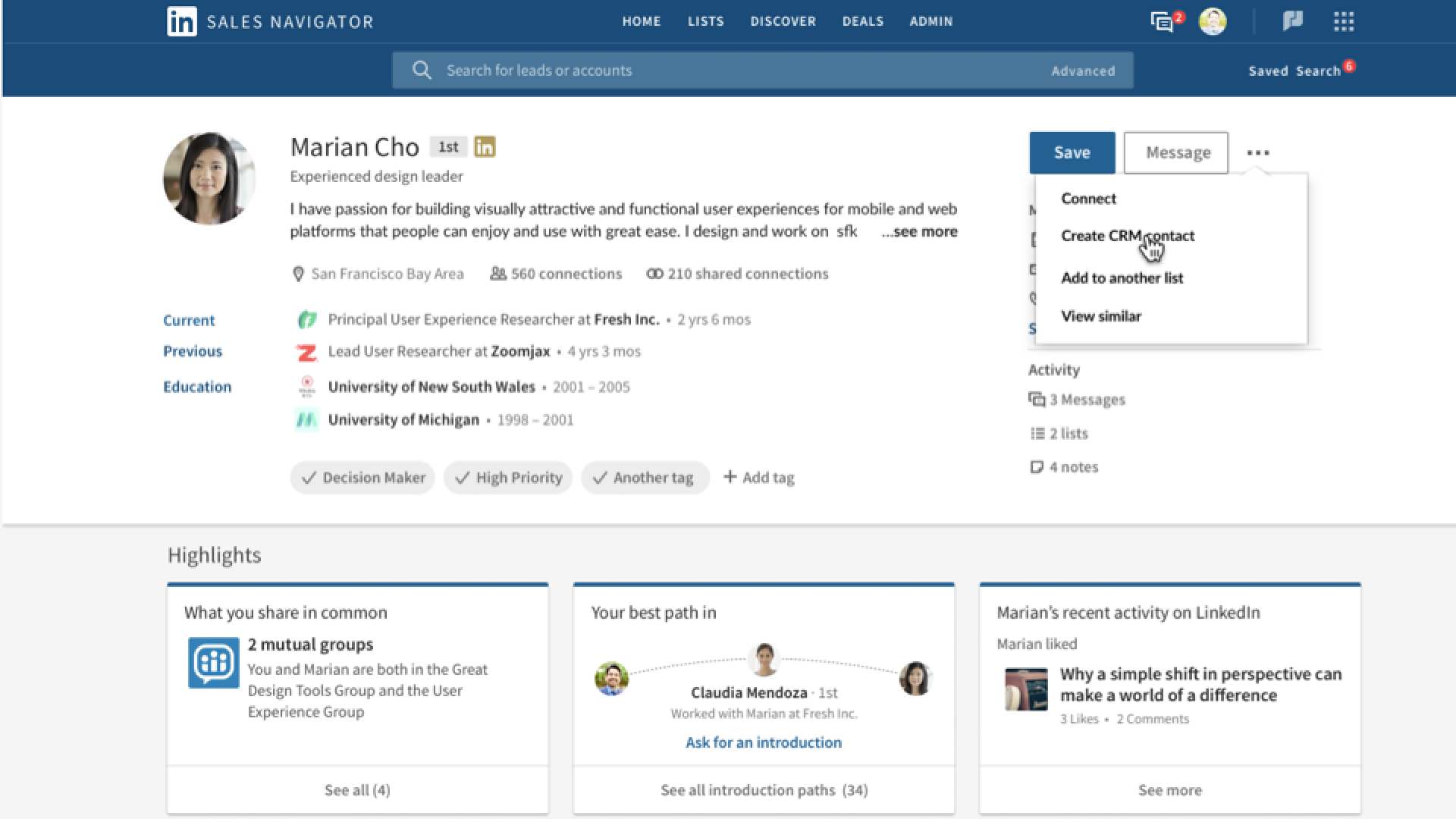
LinkedIn Sales Navigator is the flagship B2B sales intelligence and prospecting platform from LinkedIn, built to help sales teams identify, understand, and engage decision‑makers using the power of LinkedIn’s global professional graph and AI‑driven insights. It combines advanced search, rich account and buyer signals, and integrated outreach tools like InMail and Smart Links so sellers can build and work highly targeted pipelines directly on top of LinkedIn’s network. business.linkedin.com LinkedIn itself was founded in 2002 and, since its 2016 acquisition by Microsoft, has grown into a global organization with around 18,500 employees serving more than a billion members, with Sales Solutions (including Sales Navigator) as one of its four primary revenue lines. en.wikipedia.org

Sales Navigator sits at the center of LinkedIn’s “deep sales” strategy: connecting buyers’ real‑time activity on the network with AI features like Account IQ, Lead IQ, and Sales Assistant to surface the right accounts, the right people, and the right moments to engage. It offers tight CRM integrations, mobile apps, and a growing ecosystem of integrations with tools like Salesforce, HubSpot, Microsoft Dynamics 365, Gong, G2, Salesloft, and Outreach so reps can work from within their existing revenue stack. business.linkedin.com

In the crowded sales intelligence market, Sales Navigator’s primary differentiator is LinkedIn’s first‑party, self‑maintained member data and engagement signals, which many buyers view as fresher and more reliable than third‑party contact databases. Real‑time alerts on job changes, company growth, and content engagement, combined with warm‑introduction capabilities via TeamLink, position Sales Navigator as a core system of insight for account‑based selling, strategic account management, and executive‑level outreach. business.linkedin.com

As a product, Sales Navigator has steadily evolved from a search and list‑building tool into a broader “deep sales” platform with embedded AI, advanced CRM sync, and ROI reporting for large enterprises. LinkedIn continues to invest heavily in AI features such as Account IQ, Lead IQ, Message Assist, and Sales Assistant, and backs Sales Navigator with enterprise‑grade security and compliance, including SOC 2 Type II and ISO 27001/27018 certifications that cover Sales Solutions. business.linkedin.com


Key Features

Advanced lead and account search filters to target prospects by role, seniority, industry, geography, company size, and more.

AI-powered Account IQ summaries that generate instant, high-impact overviews of target accounts for faster research and account planning. business.linkedin.com

AI-powered Lead IQ insights that aggregate key lead details and recommended engagement angles to personalize outreach at scale. business.linkedin.com

Sales Assistant (agentic AI, in beta) that surfaces recommended leads, alerts, and next-best actions to help reps book more meetings and close deals faster. business.linkedin.com

Real-time alerts on buyer and account signals such as job changes, new posts, company news, and headcount growth so sellers can act at the right moment. business.linkedin.com

InMail messaging to reach prospects directly on LinkedIn, even without a connection, with 50 InMail credits per user per month on core plans. business.linkedin.com

Custom lead and account lists, Account Hub, and saved searches to organize territories, track engagement, and collaborate across teams. business.linkedin.com

TeamLink and TeamLink Extend to discover warm introduction paths through colleagues and broader company networks. business.linkedin.com

Smart Links to bundle content into trackable links and see who views which assets and for how long, enabling better follow-up. business.linkedin.com

Deep CRM integrations and CRM Sync with Salesforce, Microsoft Dynamics 365, and HubSpot on Advanced Plus, including embedded profiles and activity writeback. linkedin.com

Embedded CRM experiences that surface Sales Navigator insights directly inside CRM UIs, reducing tab-switching and improving data hygiene. linkedin.com

Usage reporting and ROI reporting (Advanced Plus) so admins can track adoption, behavior, and revenue impact from Sales Navigator and LinkedIn activity. business.linkedin.com

Mobile apps for iOS and Android that give sellers full access to leads, accounts, alerts, and InMail while on the go. business.linkedin.com

Sales Navigator Coach and in-product guidance that recommend next steps, quick how-to videos, and best-practice workflows to help new users ramp quickly. business.linkedin.com

Pros & Cons

👍 Pros

  • Very powerful advanced search and filtering make it easy to zero in on ideal buyers and accounts that match your ICP.
  • Rich, self-maintained LinkedIn profile and company data provide fresher information and timely signals like job changes and company news.
  • Lead and account lists, saved searches, and alerts help sellers organize territories and stay on top of buyer activity without manual research.
  • Tight integrations with CRMs and tools like Salesforce, Dynamics, HubSpot, Gong, G2, Salesloft, and Outreach enable sellers to work from their existing revenue stack. linkedin.com
  • TeamLink and warm-introduction workflows help reps leverage colleagues' networks to reach hard-to-access decision makers.
  • Mobile apps and a generally intuitive interface (after onboarding) let reps prospect effectively from anywhere.
  • Reviewers frequently report that Sales Navigator materially improves pipeline quality and shortens sales cycles when used consistently. g2.com

👎 Cons

  • High price point relative to many sales tools, especially for individuals, freelancers, and smaller teams with limited budgets. capterra.com
  • Some leads and company profiles can be outdated or incomplete, and contact emails/phone numbers are generally not provided, requiring additional enrichment tools. g2.com
  • Native export, list automation, and workflow automation capabilities are limited; users often rely on third-party tools or manual steps to move data into CRMs and sequencing platforms. stackfix.com

User Reviews

G2
4.3
★★★★☆
Capterra
4.5
★★★★★
TrustRadius
8.5
★★★★★

Integrations

Salesforce Microsoft Dynamics 365 HubSpot CRM Oracle CX Sales SAP CRM SugarCRM Freshworks CRM Pega CRM Gong G2 Buyer Intent Salesloft Outreach LinkedIn Sales Navigator for Gmail Microsoft Outlook Global Relay Smarsh Theta Lake ZoomInfo Seamless.AI

Best For

Company Size

smb mid-market enterprise

Industries

SaaS Technology Professional Services Financial Services Manufacturing Staffing & Recruiting

Use Cases

Sales prospecting and lead generation Account-based selling and strategic account planning Pipeline development and territory management Upsell and cross-sell into existing accounts Event and webinar follow-up Partner and channel prospecting

FAQ

What is LinkedIn Sales Navigator?

+

LinkedIn Sales Navigator is LinkedIn's B2B sales intelligence and prospecting platform that helps individual sellers and sales teams find, understand, and engage the right buyers using LinkedIn's first-party professional data. It provides advanced search filters, AI-powered account and lead insights, lead and account lists, real-time alerts, and integrated InMail messaging, all designed to make it easier to build and work high-quality pipelines directly on top of LinkedIn's network. business.linkedin.com

How much does LinkedIn Sales Navigator cost?

+

Pricing is per-user and varies by plan and billing term. In the US, Sales Navigator Core starts around $119.99 per user per month (or $1,079.88/year), Sales Navigator Advanced starts around $159.99 per user per month (or $1,799.88/year), and Sales Navigator Advanced Plus is sold on a custom-quote basis, typically starting around $1,600 per user per year depending on volume and term. Discounts are often available for annual and high-seat-count contracts. business.linkedin.com

What are the main features of LinkedIn Sales Navigator?

+

Key features include advanced lead and account search; AI-powered Account IQ and Lead IQ summaries; Sales Assistant and Message Assist for AI-driven recommendations and drafted outreach; TeamLink and TeamLink Extend for warm introductions; Smart Links for trackable content sharing; real-time alerts on buyer and account activity; custom lead and account lists; CRM Sync and embedded profiles for Salesforce, Microsoft Dynamics 365, and HubSpot on Advanced Plus; and usage and ROI reporting for admins. business.linkedin.com

Who are LinkedIn Sales Navigator's main competitors?

+

Common alternatives to LinkedIn Sales Navigator in the sales intelligence and prospecting category include ZoomInfo SalesOS, Apollo.io, Cognism, Lusha, and SalesIntel, along with adjacent tools like Clearbit, Seamless.AI, and various sales engagement platforms that offer basic prospecting features. Many organizations combine Sales Navigator with one or more of these tools to cover both relationship intelligence on LinkedIn and broader email/phone data and automation needs.

Is LinkedIn Sales Navigator good for small businesses?

+

LinkedIn Sales Navigator can be very effective for small businesses and solo sellers whose buyers are active on LinkedIn, because it provides powerful search filters, timely buyer signals, and tools to build targeted prospect lists without needing a large tech stack. However, the per-seat price is relatively high compared with some SMB-focused tools, and it does not include bulk email or phone data, so very small teams with limited budgets or those needing high-volume outbound may find better value pairing a single Sales Navigator license with lower-cost data and outreach tools, or choosing a more all-in-one alternative.

Book a Call

Ready to Scale Your Pipeline?

Schedule a free strategy call with our sales development experts.

SCHEDULE A MEETING TODAY!
1
2
3
4

Enter Your Details

Select Your Meeting Date

MONTUEWEDTHUFRI

Pick a Day

MONTUEWEDTHUFRI

Pick a Time

Select a date

Confirm

SalesHive API 0 total meetings booked
SCHEDULE A MEETING TODAY!
1
2
3
4

Enter Your Details

Select Your Meeting Date

MONTUEWEDTHUFRI

Pick a Day

MONTUEWEDTHUFRI

Pick a Time

Select a date

Confirm

New Meeting Booked!