Grammarly Business

Empower teams with effective and efficient communication, wherever they write.

Content Creation & AI Writing
★★★★★ 4.7
2009 Founded
1001-5000 Employees
70,000+ teams and 50,000+ organizations Customers
San Francisco, California, United States Headquarters

Quick Facts

✓ Free Trial
Starting Price
12
Pricing Model
per-user
Free Trial
7 days
Company Type
private

About Grammarly Business

Grammarly Business is the team-focused offering of Grammarly, the widely adopted AI writing assistant used by tens of thousands of organizations worldwide. It provides real-time suggestions for grammar, spelling, punctuation, clarity, and tone directly inside the tools employees already use—email, office suites, browsers, collaboration platforms, and more. Building on Grammarly’s consumer strength and familiarity, Grammarly Business layers in governance, collaboration, and security controls tailored to business needs.

For organizations, Grammarly Business goes far beyond basic proofreading. Teams can roll out company style guides, brand tone profiles, and reusable snippets so that every email, ticket response, document, and social post reflects the same voice and standards. Generative AI features help employees brainstorm, draft, and rewrite content in seconds while staying aligned with brand and compliance guidelines. Analytics dashboards let leaders understand adoption, measure how often suggestions are applied, and quantify time savings and quality improvements.

The product is developed by Superhuman Platform Inc. (formerly Grammarly Inc.), a privately held company founded in 2009 and headquartered in San Francisco with additional hubs in Kyiv, Vancouver, Berlin, Warsaw, New York, and other locations. Grammarly has evolved from a grammar checker into a broader AI productivity platform, supported by more than $1.4B in funding and serving over 40 million daily users and tens of thousands of teams globally. In 2025 the company rebranded its parent entity to Superhuman, but the Grammarly writing assistant and Grammarly Business capabilities continue as core components of the suite.

In the market for content creation and AI writing tools, Grammarly Business is known for its deep cross-application coverage (working in over 500,000–1,000,000 apps and sites), strong security and compliance posture, and balance of human-sounding suggestions with powerful automation. It competes with both horizontal AI-writing platforms and more niche brand-governance tools, often winning when organizations want fast time-to-value, broad end-user adoption, and enterprise-grade controls without forcing teams into a new editor or workflow.

Key Features

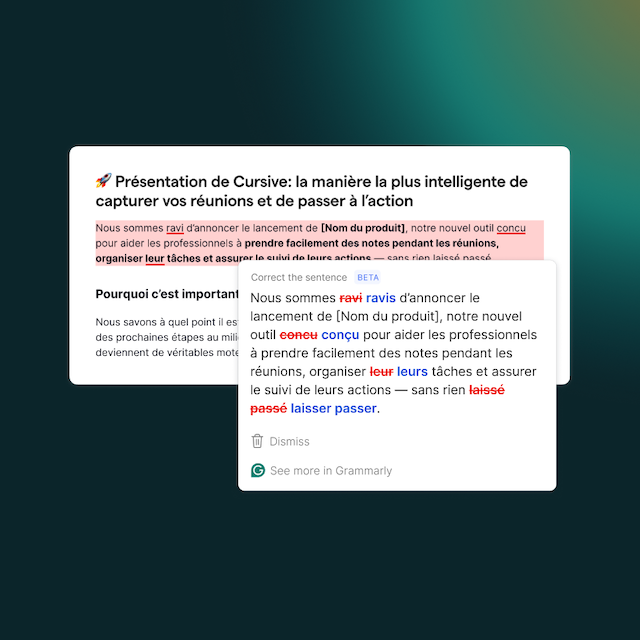
Real-time grammar, spelling, and punctuation checking across emails, documents, chats, and web apps.

Generative AI to brainstorm ideas, draft first versions, and rewrite or expand content from short prompts.

Tone detection and tone rewriting so messages match the desired level of formality, confidence, and politeness.

Custom style guides that surface brand and terminology rules as writers type, enforcing consistent language across teams.

Brand tones that define on-brand and off-brand tones for different teams and use cases, with in-line feedback to stay on voice.

Snippets for centrally managed, reusable phrases and templates that speed up responses in sales, support, and operations.

Knowledge Share to surface internal definitions, FAQs, and key documents directly in the writing surface based on terms and context.

Plagiarism detection for long-form content, academic-style writing, and public-facing materials that need originality checks.

Team analytics dashboards that show adoption, suggestion acceptance rates, tone usage, and time saved across the organization.

Admin console with granular roles, permissions, and feature access controls for Pro and Enterprise deployments.

SAML single sign-on (SSO) and SCIM provisioning to streamline secure user authentication and automated lifecycle management.

Centralized billing and billing groups to manage spend and license allocation across departments and regions.

Cross-platform apps and browser extensions that bring Grammarly into more than a million web and desktop applications.

Support for multiple English dialects (US, UK, Canadian, Australian, Indian) with region-specific spelling and style rules.

Enterprise-only features such as confidential mode, data loss prevention integrations, and advanced security and compliance controls.

Pros & Cons

👍 Pros

  • Accurate, real-time grammar, spelling, and punctuation suggestions that significantly reduce errors in business communication.
  • Very easy to use and runs quietly in the background across Gmail, Google Docs, Microsoft Word, Outlook, Slack, and other everyday tools.
  • Helpful tone, clarity, and rewrite suggestions that make emails, reports, and client messages more concise, professional, and on-point.
  • Team-focused capabilities such as shared style guides, brand tones, snippets, and Knowledge Share that keep writing consistent with brand voice and terminology.
  • Plagiarism detection and generative AI assistance that speed up drafting and editing while helping teams maintain originality and save time.

👎 Cons

  • Suggestions can be overly formal or prescriptive and sometimes change the intended meaning of technical, creative, or highly contextual text.
  • Subscription pricing can feel expensive for freelancers, students, or very small teams compared with lighter-weight or one-time-purchase alternatives.
  • The floating widget and pop-up suggestion cards can occasionally feel intrusive or get in the way, and the tool relies on a stable internet connection to function.

User Reviews

G2
4.7
★★★★★
Capterra
4.7
★★★★★
TrustRadius
9.1
★★★★★

Integrations

Google Docs Google Workspace Gmail Microsoft 365 Microsoft Word Microsoft Outlook Microsoft PowerPoint Microsoft Teams Slack Salesforce Sales Cloud HubSpot Marketing Hub HubSpot Sales Hub Zendesk Jira Confluence Notion WordPress Zoom Workplace Smartsheet Canva Asana Mailchimp Google Chrome Safari Mozilla Firefox Microsoft Edge

Best For

Company Size

smb mid-market enterprise

Industries

Technology & SaaS Professional Services Financial Services Education Healthcare & Life Sciences E-commerce & Retail

Use Cases

Customer support replies and helpdesk tickets Sales outreach, prospecting emails, and proposals Marketing copy, campaigns, and landing pages Internal communications, announcements, and documentation HR and recruiting communications, job descriptions, and offer letters Reports, presentations, and board-ready documents

FAQ

What is Grammarly Business?

+

Grammarly Business is the team and enterprise-focused version of Grammarly, the popular AI writing assistant. It brings real-time grammar, spelling, punctuation, clarity, and tone suggestions into the apps your organization already uses - such as Google Docs, Gmail, Microsoft Word, Outlook, Slack, Salesforce, and Zendesk - so employees can write clearer, more consistent, and more professional content. Beyond core proofreading, it adds team features like style guides, brand tones, snippets, Knowledge Share, analytics, and admin controls tailored for organizations.

How much does Grammarly Business cost?

+

Grammarly's current business-focused plans are sold under the Grammarly Pro and Enterprise offerings. Grammarly Pro starts at about $12 per member per month when billed annually (or $30 per member per month on a monthly plan), with up to 149 seats per Pro account. Enterprise plans support unlimited members with advanced security, data controls, and dedicated support, and pricing is available on request from the sales team. A free plan with basic functionality is also available, and Grammarly periodically offers a 7-day free trial of Pro for eligible users.

What are the main features of Grammarly Business?

+

Key Grammarly Business features include real-time grammar, spelling, punctuation, and clarity checks; generative AI for drafting and rewriting; tone detection and tone rewrites; custom style guides and brand tone profiles; centrally managed snippets for reusable responses; Knowledge Share to surface internal definitions and documentation as users type; plagiarism detection; team analytics dashboards; SAML SSO and SCIM provisioning; granular admin roles and feature controls; and cross-platform support via browser extensions, desktop apps, and mobile apps.

Who are Grammarly Business's main competitors?

+

Grammarly Business competes with a range of AI writing and brand-governance platforms. Common alternatives include Writer, which focuses on enterprise brand voice and custom models; Jasper, which emphasizes generative marketing content and campaigns; ProWritingAid, known for in-depth style analysis and editing; QuillBot Business, which offers paraphrasing and summarization at scale; and Wordtune, which specializes in rewriting and tone control while teams draft content.

Is Grammarly Business good for small businesses?

+

Yes. Many small and mid-sized businesses use Grammarly Pro and Grammarly Business features to professionalize customer communication, sales outreach, and internal collaboration without adding complex new software. Because deployment is usually as simple as installing an extension or desktop app, smaller teams can get value quickly. However, very budget-constrained or non-English-focused small businesses may find the subscription price high relative to simpler tools, so it's worth testing the free plan and any available Pro trial before rolling it out broadly.

Book a Call

Ready to Scale Your Pipeline?

Schedule a free strategy call with our sales development experts.

SCHEDULE A MEETING TODAY!
1
2
3
4

Enter Your Details

Select Your Meeting Date

MONTUEWEDTHUFRI

Pick a Day

MONTUEWEDTHUFRI

Pick a Time

Select a date

Confirm

SalesHive API 0 total meetings booked
SCHEDULE A MEETING TODAY!
1
2
3
4

Enter Your Details

Select Your Meeting Date

MONTUEWEDTHUFRI

Pick a Day

MONTUEWEDTHUFRI

Pick a Time

Select a date

Confirm

New Meeting Booked!