Scratchpad review
The AI workspace built for sales
Scratchpad is an AI-powered sales workspace that sits on top of Salesforce, automating CRM updates, call summaries, and pipeline hygiene so reps spend more time selling.
Independently researched by SalesHive. This page is not sponsored by or affiliated with Scratchpad. Research updated December 2025.
What is Scratchpad?
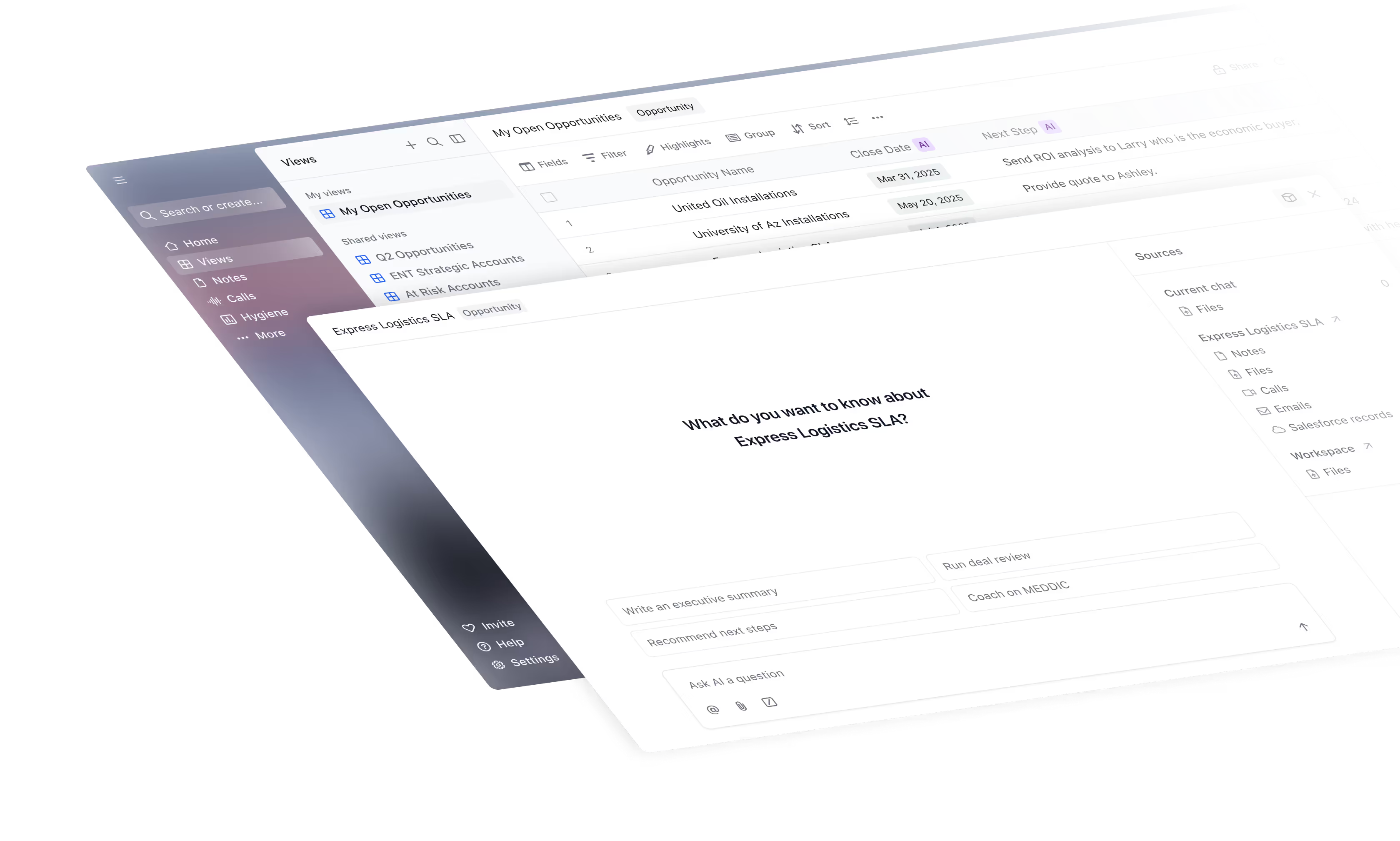
Scratchpad is a revenue workspace and AI sales execution platform built specifically for teams that run on Salesforce. It combines a modern, spreadsheet-like interface, guided sales notes, call recording, and AI automation in a single workspace so sellers can update pipeline, capture call insights, and follow their methodology without living inside Salesforce’s native UI. The product’s goal is to remove low-value admin work, improve CRM hygiene, and give leaders real-time visibility into every deal.
The platform connects directly to Salesforce via API and layers on tools that sellers actually enjoy using: AI-native sheets and Kanban boards for pipeline, an AI notetaker and recorder for calls, automated field updates, executive summaries, and hygiene monitoring. Scratchpad Agents listen to calls, read emails and notes, and propose or directly apply structured updates to Salesforce fields such as next steps, qualification criteria, close dates, and amounts. This creates a continuously updated view of the business while freeing reps from manual data entry.
Founded in 2019 by Pouyan Salehi and Cyrus Karbassiyoon, Scratchpad has raised venture funding from firms such as Accel and Craft Ventures and grown to dozens of employees. The company reports tens of thousands of users and thousands of customer organizations using its workspace to manage pipeline, run deal reviews, and keep Salesforce data clean. Well-known customers include Autodesk, Brex, Cisco, Segment, Twilio, Snowflake, Talkdesk, Udemy, Upwork, Vercel, and many high-growth SaaS companies.
In the RevOps and sales analytics ecosystem, Scratchpad positions itself as the AI workspace layer that sits between sellers and Salesforce, rather than replacing CRM or forecasting tools. Compared to broader revenue platforms and BI tools, it emphasizes day-to-day sales execution, fast adoption by reps, and AI-driven automation of CRM hygiene. Its consistently high ratings on G2 and Capterra reflect strong user satisfaction with ease of use, Salesforce integration, and time savings.
Scratchpad key features
Teams typically use it for sales pipeline management and forecasting, improving Salesforce CRM hygiene and data quality, AI-assisted call recording, transcription, and note-taking, and more.
- AI workspace for Salesforce. modern, fast UI with spreadsheet-like views, tiles, and Kanban boards for managing opportunities, accounts, and tasks directly on top of Salesforce.
- AI-native sales sheets. configurable grid views that let reps update large volumes of Salesforce fields inline, replacing offline spreadsheets and manual report editing.
- Call recorder and AI notetaker. desktop app and bot that capture calls across Zoom, Google Meet, and Microsoft Teams, transcribe them, and generate summaries and action items.
- AI field updates. Scratchpad Agents analyze calls, emails, and notes and propose or auto-apply updates to Salesforce fields such as next steps, qualification fields, dates, and amounts.
- Deal & Account Agents. AI assistants that understand the full history of a deal or account and can answer questions, surface risks, and draft executive summaries or briefs.
- Hygiene monitoring. AI-driven monitoring of CRM hygiene and process adherence, with daily alerts for missing fields, stale opportunities, and out-of-process deals.
- Zero Boards & pipeline views. pipeline boards that surface deals needing attention (e.g., missing next steps, outdated close dates) so reps and managers can focus coaching time.
- Guided sales notes. structured note templates for discovery calls, opportunity summaries, and 1:1s, automatically linked to Salesforce records and tuned to methodologies like MEDDIC or SPICED.
- Executive summary generation. one-click or prompt-based generation of concise deal and account summaries for forecast calls, QBRs, and leadership updates.
- Post-call follow-up drafting. AI that drafts personalized follow-up emails after calls based on transcripts, notes, and Salesforce context, ready for reps to review and send.
- Pre-call briefs. AI-generated pre-call prep documents that pull in recent activity, stakeholders, open opportunities, and key risks so reps show up prepared.
- Scratchpad Command. keyboard shortcut (CMD/CTRL+J) to search, create, and update Salesforce records from any web page without switching tabs.
- Slack and email workflows. send AI summaries and key updates into Slack or email so managers and collaborators see important deal context without logging into Salesforce.
- Custom AI prompts and governance. prompt library and permissions that let RevOps define and control the prompts used for summaries, coaching, and field updates.
- Enterprise-grade security. SOC 2 Type II-compliant infrastructure with Salesforce-permission inheritance and alignment with GDPR and CCPA guidelines.
What reviewers love, and what to watch
A balanced view of Scratchpad, drawn from public reviews and product research.
Pros
- Very easy to use and significantly faster than working directly in Salesforce, especially for updating many fields or records at once.
- Deep Salesforce integration with inline editing, tiles, and views that keep pipeline and notes in sync without complex report building.
- AI features such as call summaries, suggested field updates, and automated follow-ups save reps considerable time and improve CRM hygiene.
- Clean, intuitive interface that helps reps stay organized on accounts, notes, and tasks, leading to better forecast discipline.
- Responsive, high-touch support team that listens to feedback and frequently ships requested product improvements.
- Consistently strong user satisfaction scores on multiple review platforms, with many reviewers calling it a “game changer” for daily workflow.
Cons
- Price can feel high for some teams, especially when positioned as an additional layer on top of an existing Salesforce investment.
- Some users would like more advanced functionality in views and reports (for example, richer grouping, sorting, or access to more Salesforce objects).
- Occasional limitations or delays in integrations (e.g., sync timing with Salesforce or call processing), and no dedicated native mobile app experience.
Tool research is the easy part.
Someone still has to build the lists, write the copy, make the calls, and book the meetings.
SalesHive is the B2B sales agency that books qualified meetings for your team, cold calling and email outreach run end-to-end by US-based SDRs on our own AI platform.
- 01Sales Strategy
Turn your ICP, offer, and market into messaging that earns attention.
- 02List Building
Build a verified prospect universe around the accounts most likely to buy.
- 03Email Outreach
Start relevant conversations with eMod personalization written for each prospect.
- 04Cold Calling
Put US-based SDRs on the phones every day with a platform built for volume.
- 05Appointment Setting
Qualify real interest and move the right buyers directly onto your calendar.
Scratchpad pricing
Published pricing at the time of research. Always confirm current rates with the vendor.
- AI workspace with sheets, notes, and modern Salesforce UI
- Call Recorder & Notetaker (desktop or bot) with transcription and summaries
- AI field updates for Salesforce records
- Deal & Account Agent for AI insights on each record
- Custom AI prompts and prompt insights
- Hygiene monitoring for individual users
- Integrations with Zoom, Google Meet, Gmail, Outlook, Microsoft Teams, and Slack
- 400 AI credits per user per month
- All Solo features
- Team-level workspace controls and advanced permissions
- Workspace-wide hygiene dashboards and reporting
- Deeper Gong integration for syncing recorded calls
- Pooled AI credits across the team (800 credits per user per month equivalent)
- Configuration support and white-glove assistance for AI agent design and rollout
Free plan for up to five users with core workspace features, call recorder and notetaker limited to 10 hours per month, and 100 AI credits per user per month; advanced features and higher credit pools require paid plans.
Who Scratchpad is for
A strong fit for
Scratchpad is ideal for B2B organizations that run their go-to-market on Salesforce and have multi-rep sales teams that struggle with CRM adoption, scattered notes and spreadsheets, and inconsistent process adherence. It particularly suits SaaS and technology companies with 10+ sellers that want AI to automate data entry, keep pipeline current, and give RevOps and leadership real-time confidence in their forecasts.
Probably not for
Scratchpad is less suitable for teams that do not use Salesforce as their primary CRM, very small organizations with only a few deals and minimal process, or companies requiring a fully offline solution or a native mobile app. Highly regulated organizations with strict data residency or GDPR requirements may also need to evaluate Scratchpad’s evolving compliance posture before adopting it broadly.
How Scratchpad compares
Compared to broader revenue platforms like Clari or forecasting-first tools, Scratchpad is more narrowly focused on the seller workspace and day-to-day execution layer on top of Salesforce. It does not aim to replace Salesforce or your BI stack; instead, it gives sellers and front-line managers a faster, more intuitive way to interact with CRM data while AI automation keeps records current. This makes it particularly attractive to RevOps teams that want better data quality and process adherence without a heavy systems overhaul.
Versus direct workspace-style competitors such as Dooly, Scratchpad differentiates with deeper AI automation (Agents, hygiene monitoring, pre- and post-call workflows) and an expanded footprint into call recording and coaching. At the same time, it remains lighter-weight and faster to deploy than many all-in-one revenue platforms. Organizations that already lean heavily on Salesforce reports and dashboards for analytics often adopt Scratchpad as the missing execution layer, while those needing full forecasting, pipeline analytics, and multi-object modeling may still pair it with tools like Clari or internal BI solutions.
Frequently asked about Scratchpad
The short version is on the surface. Open any question to go deeper.
Ready to fill your pipeline?
Choose a 30-minute time and we will map out exactly how SalesHive can book meetings for your team.